Automating Codex
There’s an adage that says using AI is like having an intern at your disposal. The metaphor usually carries a negative connotation — a lowly helper without much skill. But it’s apt because of the style of work AI actually does.
- You set an intern off to go do some work
- They come back saying they’ve completed their assignment
- You show them where there are gaps, and nudge them in the right direction
- Repeat 5-10x until they get where you wanted them to go
Last week OpenAI released an app for their coding agent Codex. 1 At first glance, it looks like it just makes their Codex CLI more accessible — much like Claude Cowork is an interface to Claude Code for people who don’t live in a terminal. But there’s a premiere feature that instantly provided value: automations.
Automations
An automation in Codex is as simple as it sounds. You configure a task to run on a regular basis, and it goes off and does some work for you. This work can be anything — and it’s safer than other approaches because it runs in whatever sandbox environment you’ve set up.
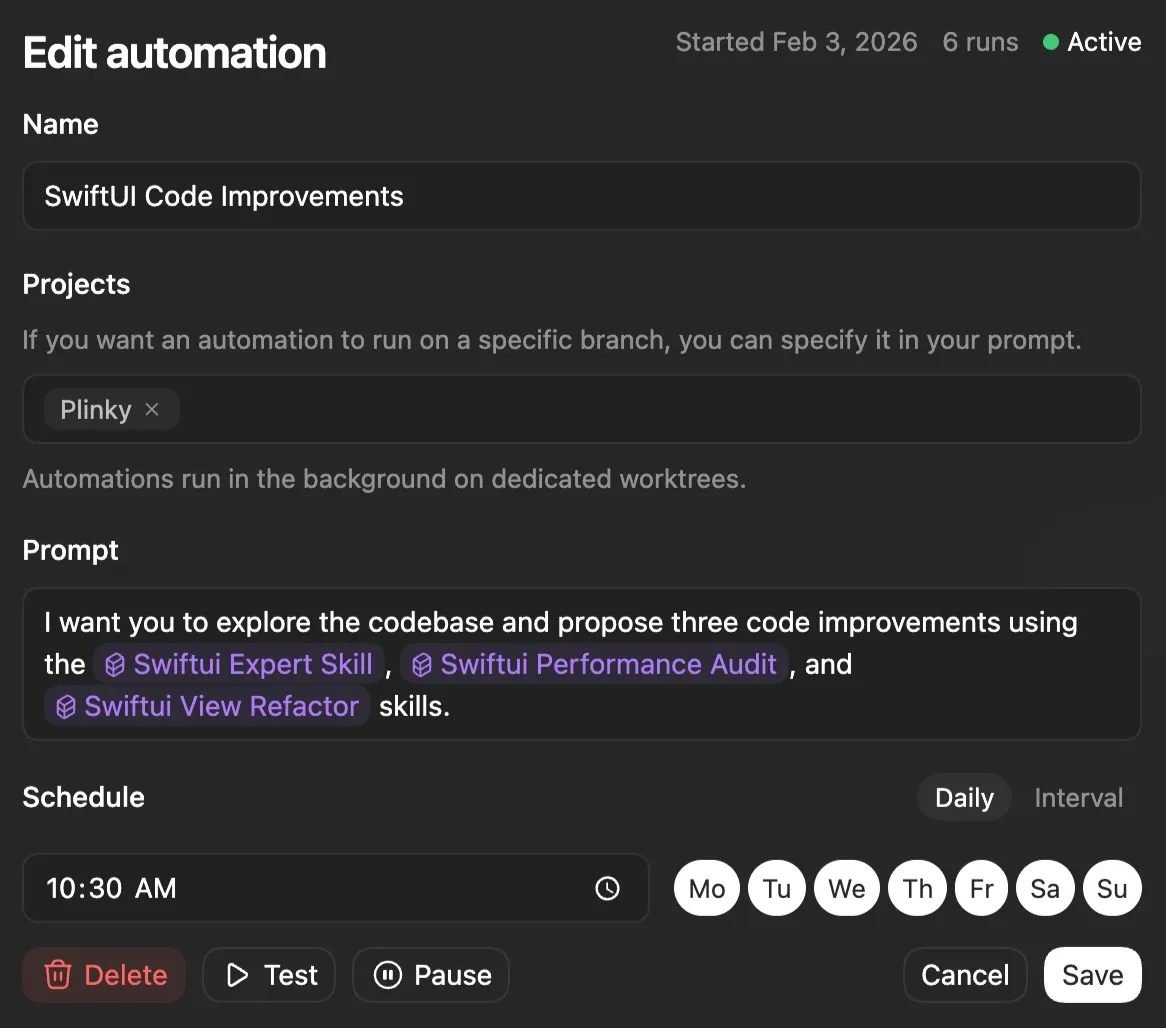
Setting up an automation is easy. You give Codex a title, decide which projects it can access, and write a prompt to execute. Then you pick how often the automation will run — and it’ll execute whenever your computer is on. (In the future, automations will run in Codex Cloud, so you won’t need to keep your computer on.)
Your Summer Intern
Let’s push the intern analogy a little further. On their first day, an intern knows nothing and your job is to teach them the ropes. They don’t know anyone, don’t know what they’ll be doing, and don’t even know how you take your coffee. You should expect little from a college kid who’s never held down a full-time job before.
By summer’s end though, they’ll have experience under their belt. They know their projects, understand how to work with product and design, and you can leave them alone for longer stretches of time. If you’ve been working closely with them, they may even anticipate your next move.
This anticipation is what automations do so well. If you’ve defined a task well, you suddenly have an intern who understands what you need. Not only can they do it, but they’re confident and now proactive about it. This is the agentic unlock that automations bring — what really separates an automation from using ChatGPT to solve a problem.
Real World Automations
My first automation was inspired by a tweet from Dominik Kundel of OpenAI’s SDK team:
💪 Have Codex automatically become better
— dominik kundel (@dkundel) February 2, 2026
Add a daily task to read your past sessions in ~/.codex/sessions and update your https://t.co/DKdqY6VTPu files or update/create new skills for common tasks. pic.twitter.com/8ME7LWu3ML
That got me thinking: what else could I make Codex do while I slept? I wanted something small enough to easily review, but important enough to actually derive value from. Basically, I want someone to help me with all the low-hanging fruit on my roadmap — so that’s exactly the automation I set up.
Low Hanging Fruit
I built a simple automation that works like this:
- Codex reads Plinky’s internal roadmap, which I keep in a Craft doc. This document is accessible via MCP, so Codex can read through my backlog of features and issues.
- Codex reads my codebase to understand how easy or hard each task will be.
- Then it builds a small feature, improves code quality, or fixes up some technical debt.
I turned those steps into a prompt:
We are looking to pick off one piece of low-hanging fruit based on the state of our roadmap and our codebase. (This will usually be main, but not always.) This will take the shape of a clean up task to improve code quality, a fix for some technical debt you encounter, or something small from our roadmap.
The roadmap is accessible via our plinky_roadmap MCP server.
I want you to read through our codebase so you can understand the current state of our app. Then you will read the roadmap and find an item that is not done, but you would estimate has a small level of effort but a high level of return. It’s important to note that the two may be slightly out of sync, but that the code is our source of truth. (If there’s a completed task on our roadmap that seems to not be marked as complete, you can include that in your response.)
Then I want you to execute on a code quality improvement, a feature that you think would be valuable to Plinky, or even an improvement to our documentation at an important or tricky point in the code. Every task you do requires a code review so try to not add too much work onto our plate — and focus on high leverage actions.
And the results were instantly useful! Codex cleaned up extraneous logging code from debugging Plinky’s browser extension, modernized SwiftUI call-sites from the deprecated foregroundColor API to foregroundStyle, and caught that my CSV exporter used \n instead of carriage returns.
These are small paper cuts that accumulate over 5 years of work, but fixing them one by one creates a better home for your code. Better yet, Codex went to my roadmap and found a hastily scrawled note that said “Add tests to LinksListFilterStateTests that validate ordering for pinned links.” I’d promptly forgotten about this after writing it down — but a few seconds later I had tests.
I re-ran the automation a few more times and the results got even better. Codex fixed a bug in how I parse webhook payloads, extracted repetitive code into a private helper function, and found a subtle performance improvement by pre-sorting an array I was re-sorting on every View recalculation. All I did was write a prompt and I had a bug fix, improved code, and a small scrolling hitch had been eliminated.
The Future Is Automation
It’s not hard to see where this is going — any task that fits the shape of software is a task that can be automated. An indie like me is thrilled to have extra hands, but tools like these work for teams small and large.
I started with a small scope because code review is still my bottleneck, but I’ve continued tweaking my prompts and adding more responsibility. Your intern is only as good as your prompts. I’ve spoken at length about how your ability to prompt and build context for an agentic system is paramount, but I’ve also set my coding environment up with Codex Skills to make Codex write code the way I like it written.
Automations are new, so I haven’t implemented all of these yet, but here are a few ideas you can try:
Nightly issue triage: Scan your issue tracker (Sentry, GitHub Issues, Linear) to assign priorities, identify duplicates, and suggest labels.
Prompt
Triage open issues for this project.
Review open issues from the issue tracker and recent commits for context.
For each issue, determine category, relative priority (high/medium/low), and whether it appears to be a duplicate.
Produce:
- A short list of high-priority issues with justification.
- Suspected duplicates and why they overlap.
- Suggested labels or metadata.
Do not close issues or make destructive changes.
Automated architectural docs: Parse code changes and update or infer architectural diagrams and high-level readmes.
Prompt
Keep architectural documentation aligned with the codebase.
Review recent commits, existing README and architecture docs, and overall project structure.
Identify meaningful changes to components, data flow, boundaries, or integrations.
Propose concise updates to existing documentation, or specific additions where gaps exist.
Focus on preserving intent and helping new contributors understand the system. Keep changes minimal.
Automated test health monitor: Evaluate your test suite to find flaky tests, suggest missing edge cases, and propose new tests for untested logic.
Prompt
Evaluate the overall health of the test suite.
Review test files, recent failures or flakes, and recently changed code paths.
Identify:
- Flaky or brittle tests
- Important logic paths lacking coverage
- Redundant or low-signal tests
Produce:
- A short list of test risks.
- One or two high-leverage test improvements.
Avoid broad rewrites. Optimize for confidence per line of test code.
Product surface area audit: Periodically list features users can see, can’t discover, and misunderstand. Then suggest one small affordance — a copy tweak, default, or UI nudge to reduce that gap.
Prompt
I want you to audit the current product surface area of this project.
First, read through the codebase, UI components, feature flags, onboarding flows, and any relevant product documentation to understand what the product can do today.
Then produce three short lists:
- Features that are clearly visible and discoverable to users.
- Features that exist but are difficult to discover without prior knowledge.
- Features that users are likely to misunderstand based on naming, defaults, or UI affordances.
For each item in lists 2 and 3, propose one small, low-risk improvement (copy change, default tweak, UI hint, reordering, or documentation note).
Do not propose large redesigns or new features. Optimize for leverage and simplicity.
Solicit more ideas: If you had one uninterrupted hour today, what’s the single change that would most improve the product?
Prompt
Determine the single highest-leverage improvement I could make if I had one uninterrupted hour to work on this project today.
Review recent commits, open issues, roadmap items, and relevant documentation.
Then answer:
- What is the one change that would most improve the product, developer experience, or user experience?
- Why this is high leverage right now.
Constraints:
- Propose only one action.
- It must plausibly fit within one focused hour.
- Prefer actions that reduce future work or unlock momentum.
Do not include alternatives.
And if you think of any good automations, please reach out and tell me what you’ve come up with!
The models keep getting better, and as they become more trustworthy, I’ll continue delegating more to them. This is a glimpse into the agentic coding future we’ve been promised — and there’s still so much more to do.
Footnotes
-
The app is currently available for macOS, but Windows and Linux are coming soon. ↩